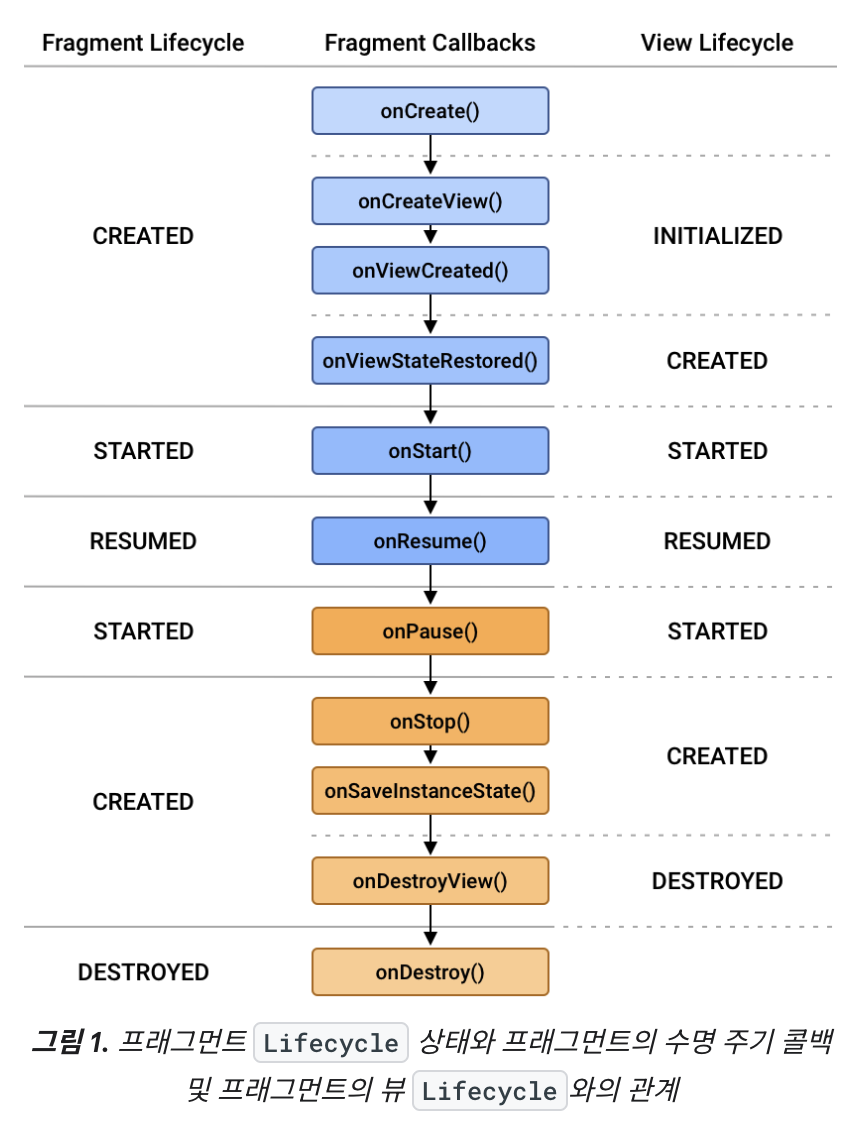
onCreateView() ──► View 생성 │ onViewCreated() ──► viewLifecycleOwner.lifecycleScope 시작 │ │ │ ├─ coroutine 1 (collect openEvent) │ ├─ coroutine 2 (collect toastEvent) │ └─ coroutine 3 (collect alertEvent) │ [다른 Fragment로 이동] │ onDestroyView() ──► View 파괴 viewLifecycleOwner.lifecycleScope내 모든 코루틴이 자동 취소된다. (Fragment는 메모리(백스택)에 남아있는 상태) [뒤로가기] │ onCreateView() ──► View 다시 생성 │ onViewCreated() ──► 새로운 viewLifecycleOwner.lifecycleScope에서 새로운 코루틴들이 시작한다.
잘못 사용한 예
1 2 3 4 5 6 7 8 9 10
classMyFragment : Fragment() { overridefunonViewCreated(view: View, savedInstanceState: Bundle?) { lifecycleScope.launch { // Fragment lifecycle viewModel.events.collect { // binding.textView 접근 → onDestroyView 후에도 실행됨! binding.textView.text = "..."// 앱 크래시 가능성이 있다. } } } }
1
2
3
4
5
6
7
8
9
10
11
12
13
onCreateView() ──► View 생성 │ ├─ lifecycleScope.launch (Fragment의 lifecycle) │ └─ collect 시작 │ onDestroyView() ──► View 파괴 (binding.textView 사라짐) │ │ (하지만 collect는 계속 실행 중인 상태) │ └─ viewModel.events.emit() 발생 └─ binding.textView.text = "..."// 앱 크래시 가능성이 있다. onDestroy() ──► 여기서야 lifecycleScope 내 코루틴들이 취소된다.
repeatOnLifecycle vs viewLifecycleOwner.repeatOnLifecycle
repeatOnLifecycle과 viewLifecycleOwner.repeatOnLifecycle도 동작 차이가 있다.
Fragment에서 사용했을 때 viewLifecycleOwner.lifecycleScope에서 launch하더라도 repeatOnLifecycle은 this.repeatOnLifecycle이기 때문에 Fragment의 View 라이프사이클이 아닌 Fragment 라이프사이클을 따르기 때문에 메모리 누수 가능성이 있다.