[Android] LifecycleScope의 종류
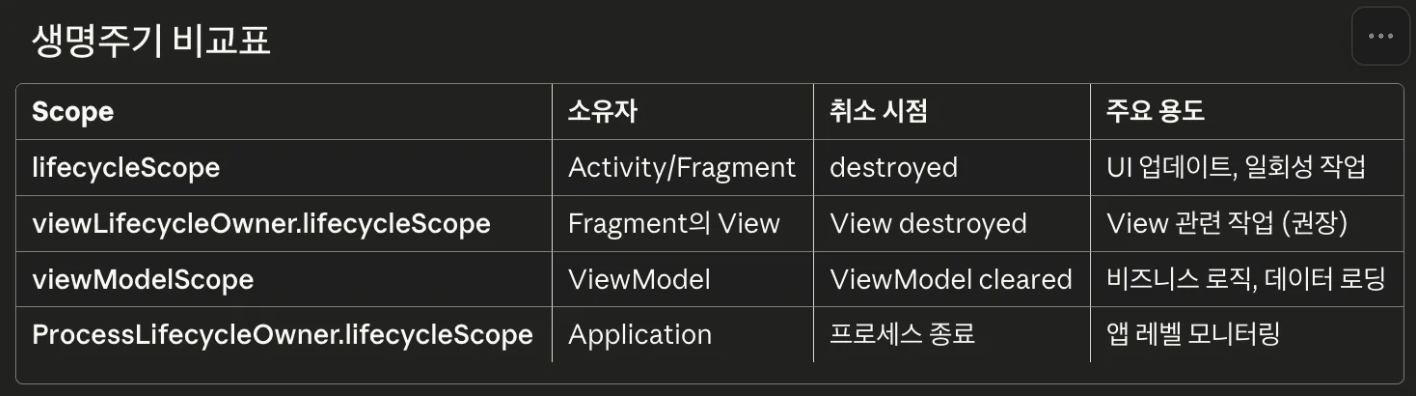
image.png

1. Activity의 lifecycleScope

  • Activity나 Fragment의 전체 생명주기를 따름
  • Lifecycle.State.DESTROYED가 되면 자동으로 코루틴 취소

따라서 아래 코드는 “3datastore=PATTERN” 로그만 찍힌다.

1
2
3
4
5
6
7
8
9
10
11
12
13
14
15
16
17
18
19
20
21
22
23
override fun onDestroy() {
DEBUG.d("leejs - onDestroy")

// 실행 안됨: Destroy를 호출하기 전에 실행
lifecycleScope.launch {
DEBUG.d("leejs - 1datastore=${viewModel.getLockMethod()}")
}

super.onDestroy()

// 실행 안 됨: Destroy된 상태기 때문.
lifecycleScope.launch {
DEBUG.d("leejs - 2datastore=${viewModel.getLockMethod()}")
}
// 실행됨: lifecycle과 관련 없는 코루틴에서 실행.
CoroutineScope(Dispatchers.Main).launch {
DEBUG.d("leejs - 3datastore=${viewModel.getLockMethod()}")
}
}

// 결과 //
// leejs - onDestroy
// leejs - 3datastore=PATTERN

2. Fragment의 viewLifecycleOwner.lifecycleScope

Fragment는 백스택에 있을 때 onDestroyView()가 호출되지만 Fragment 자체는 살아있는 상태다. 따라서 Fragment에서 lifecycleScope를 쓰게 되는 경우 메모리 누수가 발생할 수 있다. 이때 사용하는 게 viewLifecycleOwner.lifecycleScope이며, onViewCreated(뷰가 생성완료 되었을 때)에서 launch한다.

1
2
3
4
5
6
7
8
class TestFragment : Fragment() {
override onViewCreated(...) {
viewLifecycleOwner.lifecycleScope.launch {
// Fragment의 lifecycle을 따르는 (Fragment의 onCreate에서 호출하는) lifecycleScope.launch와는 다르게,
// Fragment의 View의 lifecycle을 따르기 때문에 "Fragment가 DESTROYED되기 전, 그리고 Fragment의 View가 DESTROYED된 후"의 메모리 누수를 방지할 수 있다.
}
}
}

3. ViewModel의 viewModelScope

  • ViewModel이 clear될 때만 취소됨
  • Dispatchers.Main.immediate 사용
1
2
3
4
5
6
7
class TestViewModel : ViewModel() {
init {
viewModelScope.launch {
// 해당 ViewModel의 lifecycle을 따르기 때문에 viewModel이 살아있는 동안에만(Cleared되기 전까지) 여기의 코루틴을 실행하도록 해준다.
}
}
}

4. 앱의 ProcessLifecycleOwner.get().lifecycleScope

  • Application 레벨의 lifecycle을 따르며, 앱 프로세스가 종료될 때 취소된다.
  • 앱 전체의 포그라운드/백그라운드 상태를 감지할 수 있다.
  • 앱 레벨 데이터 동기화에 사용한다.

사용처

  • Application을 상속받는 클래스 또는 위젯 관련 로직에서 사용한다.

Author

LEEJS

Posted on

2026-01-10

Updated on

2026-01-10

Licensed under

댓글